Product search on your website
Product search is a search box on your website with suggestions as you type and a results page that OneTrace.ru fills with products from your catalog. Search handles typos, word forms, and queries typed in the wrong keyboard layout, and it ranks the top results by the visitor's interests: what they viewed and bought.
Search requires the installed tracker (Connecting your website) and a product catalog (Recommendations and product catalog). Search isn't included in every plan: if your plan doesn't include it, the code block on the installation tab isn't shown, and search requests return a "feature unavailable" error.
How products are found
- Query words are searched in the product's name, brand, categories, and attributes; the SKU is matched exactly.
- Word forms in the project's languages are taken into account: "куртки" finds "Куртка зимняя". Languages are set in the project settings, see Project settings, plan, and audit.
- Typos are corrected: "крутка" finds "куртку", and "dres" finds "dress".
- A query typed in the wrong keyboard layout works too: "ghbdtn" is searched as "привет".
- If nothing matches all the words, search shows products that match at least one of them.
- Popular and in-stock products rank higher. Popularity comes from recommendations and is updated once a day.
- The top results are reordered by the visitor's interests: products from the categories and brands they viewed and bought move up.
- Sizes and parameters in the query, such as "205/55 r16", "5x112", or "winter", become filters if the store industry has them.
New and changed catalog products appear in search within a minute of a feed upload or an API request.
Search box
Add the data-cdp-search attribute to the search field on your website:
<form action="/search">
  <input name="q" data-cdp-search data-category-url="/catalog/{id}">
</form>
As you type, suggestions appear under the field: popular searches on your website, matching categories, and products with an image and price. You can move through them with the arrow keys; Enter opens the selected row, and Esc closes the suggestions. Enter without a selected row submits your website's form as usual.
| Attribute | What it sets |
|---|---|
data-cdp-search |
attaches suggestions to the field |
data-category-url |
a link to the category page; {id} is replaced with the catalog category ID; without this attribute, categories aren't shown in the suggestions |
data-search-url |
the results page address for a field without a form; {query} is replaced with the query |
Suggestions use your website's font and contain no interface text, so they fit a website in any language.
Results page
Ready-made e-commerce plugins insert the results into the store's search page on their own. On your own website, get the products from the tracker:
window.addEventListener('load', async () => {
  const q = new URLSearchParams(location.search).get('q');
  const result = await cdp.search(q, { perPage: 24 });
  // result.items — products, result.total — how many were found, result.facets — categories, brands, prices, and characteristics for filters
});
Parameters: category, brand, priceMin, priceMax, sort (relevance, popular, price_asc, price_desc), page, perPage, attributes. When a product is clicked, call cdp.searchResultClicked(product).
Characteristic filters. result.facets.attributes holds the characteristics of the store industry with labels in the visitor's language and the number of products for each value, for example "Rim diameter, inches": 16, 17, 18. Pass the selected values in attributes: cdp.search(q, { attributes: { rim_diameter: [17, 18], season: 'winter' } }). Several values of one characteristic are combined with "or", different characteristics with "and". result.filters holds the sizes and parameters recognized in the query text: show them to the visitor so it's clear why the results are filtered. Requires tracker 1.15.0.
If the query has a redirect rule (see Query rules), result.redirect holds the page address: open it instead of the results.
Servers can make the same requests with a write key: https://cdp.onetrace.ru/api/v1/search and https://cdp.onetrace.ru/api/v1/search/suggest. The full list of parameters is in the API reference: https://cdp.onetrace.ru/api/v1/openapi.json.
Query report
The Search tab of the Site section shows what visitors search for on your website over 7, 30, or 90 days:
- Searches and visitors — how many times people searched and how many different people.
- No results — the share of searches that found nothing.
- CTR — the share of visitors who clicked a product in the results of their query.
- Purchases and revenue — a product clicked in the results and bought by the same customer within 7 days. Revenue uses the product price from the catalog. Shown when a purchase event is set in the recommendation settings, see Recommendations and product catalog.
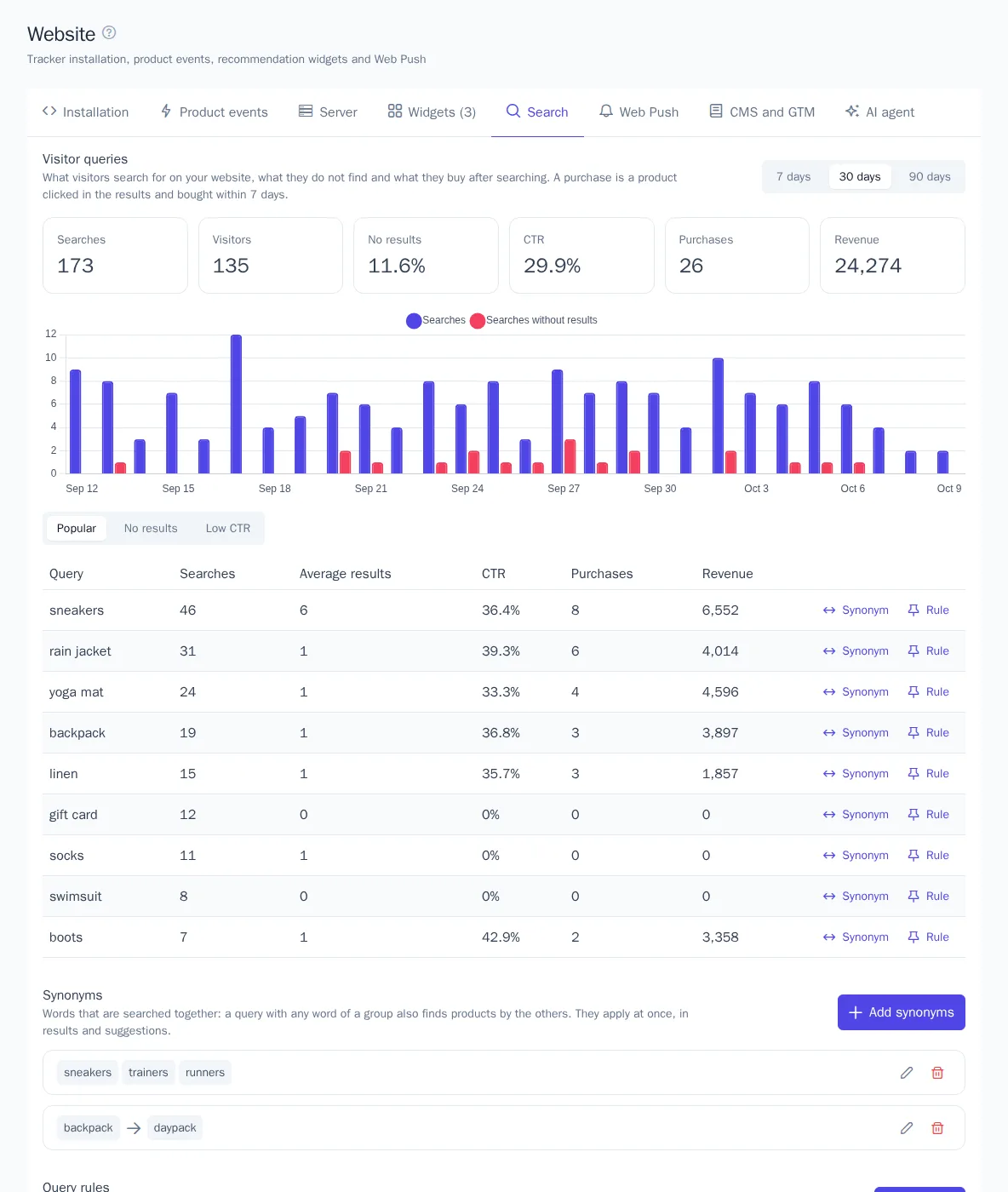
Tables under the chart:
| Table | What it shows |
|---|---|
| Popular | queries by the number of searches |
| No results | queries that never found anything: a hint at missing products or synonyms |
| Low CTR | queries with at least 5 searches where fewer than 10% lead to a click: the results are not what visitors expect |
Queries are compared ignoring case and extra spaces. From a table row you can add a synonym or a rule for the query right away.
Synonyms
Synonyms are words and phrases searched together: a query with any word of a group also finds products by the others. For example, with the group "sneakers, trainers, running shoes", the query "white trainers" also finds white sneakers.
- Two-way group — every word is searched as the others.
- One-way group — only the first word is searched as the others: "iphone → apple phone" finds apple phones for "iphone", but "apple phone" is not searched as "iphone".
A word or phrase of a group is replaced in a query only when it appears as a whole. Synonyms apply right after saving, in results and suggestions. A project can have up to 500 groups, a group up to 20 words.
Query rules
A rule applies when a visitor searches for exactly this query (ignoring case, extra spaces, and punctuation at the ends) and does one or both of these:
- Pinned products — up to 24 products in the order you set come first in the results, even if the search itself does not find them. The other results follow without repeats. Pinning applies when results are sorted by relevance and not filtered; out-of-stock products are not shown.
- Redirect — a page of your website opens instead of the results, for example "delivery" → the delivery terms page.

Redirects are followed by the tracker search box (Enter on a query with a rule), cdp.search() on your own results page (the redirect field), and the WooCommerce and Magento 2 plugins. A project can have up to 1000 rules.
Statistics
The tracker records two events:
| Event | When |
|---|---|
search |
the first page of results was shown; properties: query is the query, results is how many were found |
search_result_clicked |
a click on a product in the results or in the suggestions; properties: query, product_id, position, source |
Popular searches in the suggestions are built from search events over 30 days. The events are visible in the customer's profile card and available in segments, for example "searched but didn't buy", see Segments.