Store industry
The industry tells OneTrace.ru what your store sells. It defines which product characteristics are read from the feed and product names: clothing size, tire size and wheel bolt pattern, part number, bottle volume. These characteristics power search by size, compatible similar items, and picks in the customer's size. The industry also sets the values of the recommendation settings: for example, groceries are recommended again, and electronics are followed by accessories after a purchase.
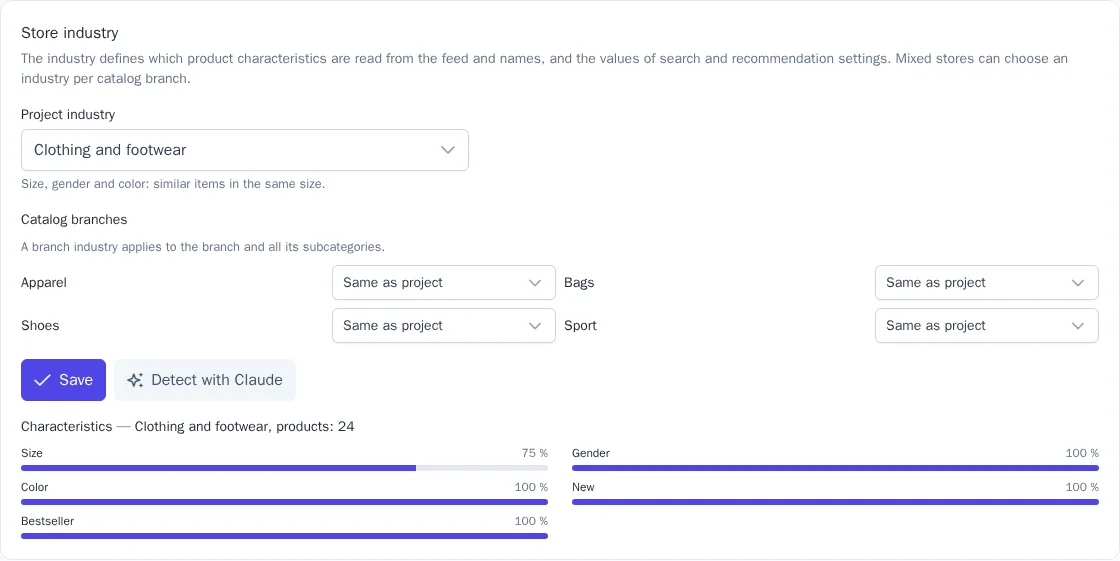
The industry is chosen under Engagement → Recommendations, in the Store industry card. Owner, Administrator, and Manager can change it.
Industries
| Industry | What is taken into account |
|---|---|
| General | nothing special: search and recommendations work as before. The default industry |
| Clothing and footwear | size, gender, color; similar items in the same size |
| Electronics and appliances | storage, RAM, screen size, color; purchased items are not recommended for a year, accessories come after a purchase |
| Grocery | pack size; purchased items are recommended again, Time to reorder works |
| Beauty and fragrance | volume, skin type, gender; purchased items are recommended again, Time to reorder works |
| Pharmacy | active ingredient, dosage, form, prescription status; purchased items are recommended again |
| Home, furniture and DIY | material, color, dimensions; add-ons come after a purchase |
| Kids and baby | age and gender: picks grow with the child |
| Auto parts | part number, car make and model |
| Tires and wheels | tire width, aspect ratio, and rim diameter, season, studs, load and speed indexes, Runflat; wheel width, bolt pattern (number of holes and PCD), ET offset, center bore DIA, wheel type; fasteners and oil viscosity |
| Pet supplies | animal and breed size; food is recommended again |
| Books and hobbies | author, ISBN, publisher |
A short description of the selected industry is shown under it.
Choose the industry
- In the Project industry field, choose the industry that fits most of your catalog.
- If your store is mixed, use the Catalog branches block to choose a separate industry for a branch, for example "Tires and wheels" for the "Auto" branch of a grocery store. A branch industry applies to the branch and all its subcategories. Same as project means the project industry.
- Click Save.
After you save, product characteristics are recalculated; this takes a few minutes. The card then shows how many products belong to each industry and what share of products has each characteristic. If a share is low, check the field names in your feed; see Where characteristics come from.
Claude suggestion
The Detect with Claude button suggests an industry for the project and its branches based on the catalog's categories and product names. The suggestion only fills in the fields: check it and click Save. The number of suggestions per month depends on your plan, and after a suggestion you can see how many are left; see Plan and billing. The button isn't shown if Claude suggestions aren't configured in your installation.
Where characteristics come from
Characteristics are read on every catalog import:
- from feed and API fields:
<param>in YML, CSV and JSON columns, and a product'sparamsin the API. Field names are recognized in different languages, ignoring case and punctuation: «Ширина», «Ширина профиля», «Width», «Кол-во отв.»; - from the product name: sizes, if the fields don't have them. "Nokian Hakkapeliitta 10 225/65 R17 102T" gives a width of 225, an aspect ratio of 65, a diameter of 17, a load index of 102, and a speed index of T; "Wheel 6.5x16 5x114.3 ET45 D60.1" gives the wheel width and diameter, bolt pattern, offset, and DIA. Season, studs, and other features are taken from the feed fields.
Part numbers and ISBNs are stored without spaces and dashes, so they are found however they are typed. The <min-quantity> feed field (for example, tires sold in sets of 4) becomes the min_quantity field of the product card in recommendations: how many to add to the cart.
Search
If product search is connected on your website, it takes the industry into account:
- sizes and parameters in the query become filters: "205/55 r16", "205 55 16", "r17", "5х112", "et45", "5w-30", as well as the words "winter", "alloy", and "studded". "Friction" means winter tires without studs. The query "alloy wheels r17 5x112" finds only R17 alloy wheels with a 5x112 bolt pattern;
- part numbers and SKUs are found however they are typed: "06a 115-561 b" finds part 06A115561B;
- industry synonyms work on their own: "tyres" is searched as "tires";
- new arrivals and bestsellers rank higher.
If nothing is found with the recognized filters, the query is searched as plain text. Your own results page gets characteristic filters and their values for a sidebar; see Results page.
Recommendations
- Similar items are compatible only. For a tire: the same size and season, with load and speed indexes no lower; for a wheel: the same bolt pattern and diameter, with an offset within ±5 mm; for clothing: the same size. If there are no compatible products, the Similar block is empty: popular items from the category wouldn't fit anyway.
- Customer's size. Every night,
pref_…traits are written to profiles: clothing size, tire size and bolt pattern, child's age, animal, car make. Personal recommendations don't suggest products in a different size. The traits are available in segments and templates:{{ traits.pref_rim_diameter }}. - After a purchase: a setting in the Events for the models block: As usual, Add-ons instead of the same thing (after a TV, brackets and cables rather than other TVs), or Repeat purchases.
- Price range of similar items: how many times more or less expensive similar items can be than the product.
- Time to reorder. For grocery, beauty, pharmacy, and pet supplies, OneTrace.ru calculates from the data how many days customers usually wait before buying a product again. The Time to reorder recommendation type shows purchased products that are due to be ordered again, and the
replenish_attrait holds the date when that time comes.
These settings take their values from the industry until you change them. If the settings differ from the industry values, the card shows the Apply industry values button.
Journey templates
The Industries category of journey templates has ready-made scenarios:
| Template | What it does |
|---|---|
| Time to change tires | an email to everyone interested in tires with picks in their size. Publish it at the start of the season, in spring and autumn |
| Your size is back in stock | a product is on sale again: an email to those who viewed it or added it to the cart or wishlist in the last 30 days and didn't buy it |
| Time to restock | when the purchase cycle says it's time to reorder, an email with the products the person buys regularly |
For Time to restock, turn on “Time to reorder” in the Events for the models block.