Transactional messages and cascades
Transactional messages are order confirmations, sign-in codes, and delivery notifications. Customers are waiting for them, so they go out right away through a separate queue: a large campaign doesn't hold them up. A cascade sends one message through several channels in turn. For example, WhatsApp first, and if it isn't delivered within 2 minutes, SMS.
You can send such a message from a journey or from your own server via the API.
Transactional template
To make a message transactional, check Transactional message in its template. Such a message is sent without checking subscription, frequency limits, or quiet hours. Emails sent through the OneTrace.ru mail service skip warm-up and go in a separate stream, without an unsubscribe link in the headers.
Don't mark advertising this way: it violates recipients' rights and damages your sender reputation.
Even a transactional message isn't sent if the channel is closed for the recipient:
| Channel | When it's closed |
|---|---|
| an email to the address bounced with a permanent error (the mailbox doesn't exist) | |
| SMS, WhatsApp | the provider reported that the number doesn't exist; the customer wrote "stop" in WhatsApp |
| Telegram | the customer sent /stop to the bot or blocked it |
| Viber | the customer unsubscribed from the bot |
Such a message gets the Skipped status with the reason "channel blocked for the recipient". The channel opens again when the customer subscribes again, for example by tapping Start in the bot. A spam complaint doesn't close the channel: order emails to that address keep arriving.
Sending via API
Your server sends a message with a POST /api/v1/messages request. You need a secret key with the Sending single messages permission. See API keys.
curl -X POST https://cdp.onetrace.ru/api/v1/messages \
  -H "Authorization: Bearer $CDP_SECRET_KEY" \
  -H "Content-Type: application/json" \
  -H "Idempotency-Key: order-A-1001" \
  -d '{
    "identity": {"type": "email", "value": "anna@example.com"},
    "template_id": 12,
    "traits": {"first_name": "Anna"},
    "data": {"order_id": "A-1001", "amount": 4990}
  }'
| Field | What it means |
|---|---|
identity |
The recipient: the identifier type and value, such as email, phone, user_id, telegram_chat_id, and others. If there's no profile, one is created |
template_id |
The message template. Its id is shown in the address of the template page |
integration_id |
The integration of the template's channel. Needed only if the channel has several active integrations |
traits |
Traits written to the profile before sending. In the template: {{ traits.first_name }} |
data |
Data for this message only. In the template: {{ context.data.order_id }} |
A 202 response contains the message id and its status. GET /api/v1/messages/{id} returns the current status: queued, sent, delivered, failed, skipped, and others, with the reason for the skip or error.
- Retrying is safe. A request with the same
Idempotency-Keyheader returns the message that was already created; a second one isn't sent. Use the order number or the operation id. - Per-recipient limit: 20 messages per hour via the API. When it's exceeded, you get
429with aRetry-Afterheader. - A regular template without the "Transactional" checkbox can also be sent via the API. In that case all messaging rules are checked.
In the ready-made PHP library this is $onetrace->messages()->send(Identity::email('anna@example.com'), 12, ['data' => [...]], 'order-A-1001'), and in the Laravel package, messages()->send(...).
Cascade in a journey
Add a Cascade message node from the Actions group to the journey. In the Channels in order field, set 2 to 5 steps. For each step, specify:
- The channel's Integration and Template.
- Wait until: what counts as success: sent, delivered, or read.
- Waiting time: for delivered and read, 15 minutes by default.
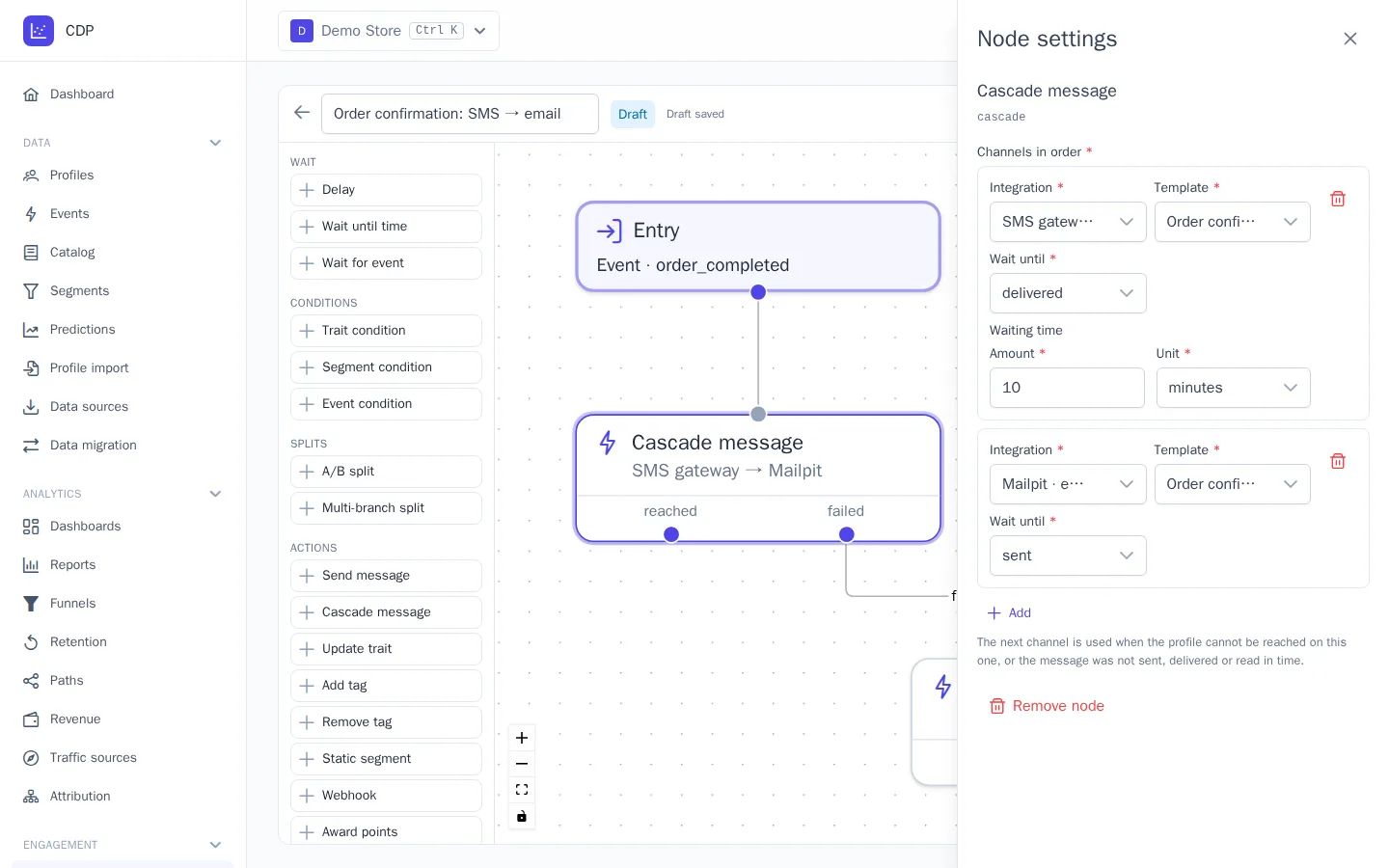
The cascade moves to the next step if:
- the profile has no address or number for the channel, or the channel is closed for it: the step is skipped right away and no message is created;
- the message wasn't sent: a sending error or a skip by the messaging rules;
- the provider reported that it wasn't delivered;
- no delivery or read confirmation arrived within the waiting time.
Not every channel supports waiting for delivery and reading:
| Wait until | Channels |
|---|---|
| sent | all |
| delivered | SMS, WhatsApp, Viber, Telegram, webhook; email only through the OneTrace.ru mail service, not through your own SMTP server |
| read | email, WhatsApp, Viber |
The node has two outputs: reached, when the message of one of the steps achieved its goal; failed, when no channel worked. While the cascade is running, the participant waits at the node.
A cascade message delivers one and the same message. Journey templates like "Cart: push → email → SMS" work differently: they send different messages with pauses until the customer places an order.
Cascade via API
Instead of template_id, pass steps, the same steps as in the journey node:
{
  "identity": {"type": "phone", "value": "+79991234567"},
  "steps": [
    {"integration_id": 3, "template_id": 21, "wait_for": "delivered", "timeout": {"amount": 2, "unit": "minute"}},
    {"integration_id": 4, "template_id": 22, "wait_for": "sent"}
  ],
  "data": {"code": "482913"}
}
wait_for accepts sent, delivered, or opened; timeout units are minute, hour, day, week. A 202 response contains the cascade id, and GET /api/v1/messages/cascades/{id} returns its state:
status:running,reached, orfailed;- the current step,
step; - the channel that worked,
reached_channel; - the step messages,
messages.
Plan
Transactional messages and sending via the API are available on all plans. Cascades are available from the Growth plan. See Plan and billing. On Starter, the node in the editor palette is marked with a lock, and the API responds with 402. If the plan is downgraded, journeys that are already running send only the first step of the cascade.