Promo codes
Promo codes are codes for messages, journeys, and friend referrals. A pool is one promotion: one shared code for everyone (for example, SUMMER10) or a unique code for each customer. The discount for a code comes from your store's coupon rule, while OneTrace.ru creates the codes, issues them to customers, and counts the orders placed with them.
The section is in the menu under Engagement → Promo codes. All roles can view pools and codes; Manager and above can create pools and issue codes.
Pools
- Open Promo codes and click Create pool.
- Enter a Name and a Template key: messages use it to refer to the pool. The key is set once.
- Choose the Type: Shared code, then enter the code, or Unique codes, then set the Code prefix and Random part length.
- Fill in the other fields (see the table below) and click Save.
| Field | What it means |
|---|---|
| Discount (text for messages) | For example, "10% off your first order". For texts only: the discount itself is set up in the store |
| Promotion starts, Last day of the promotion | Outside the period, no codes are issued and messages with them aren't sent. Dates are in the project's time zone |
| Code valid for, days | How long a unique code is valid after it's issued, but no longer than the promotion |
| Codes per customer | How many codes from the pool one customer can get |
| Warn when fewer codes left than | When the number of free codes drops below this, members with the promo code permission get an email |
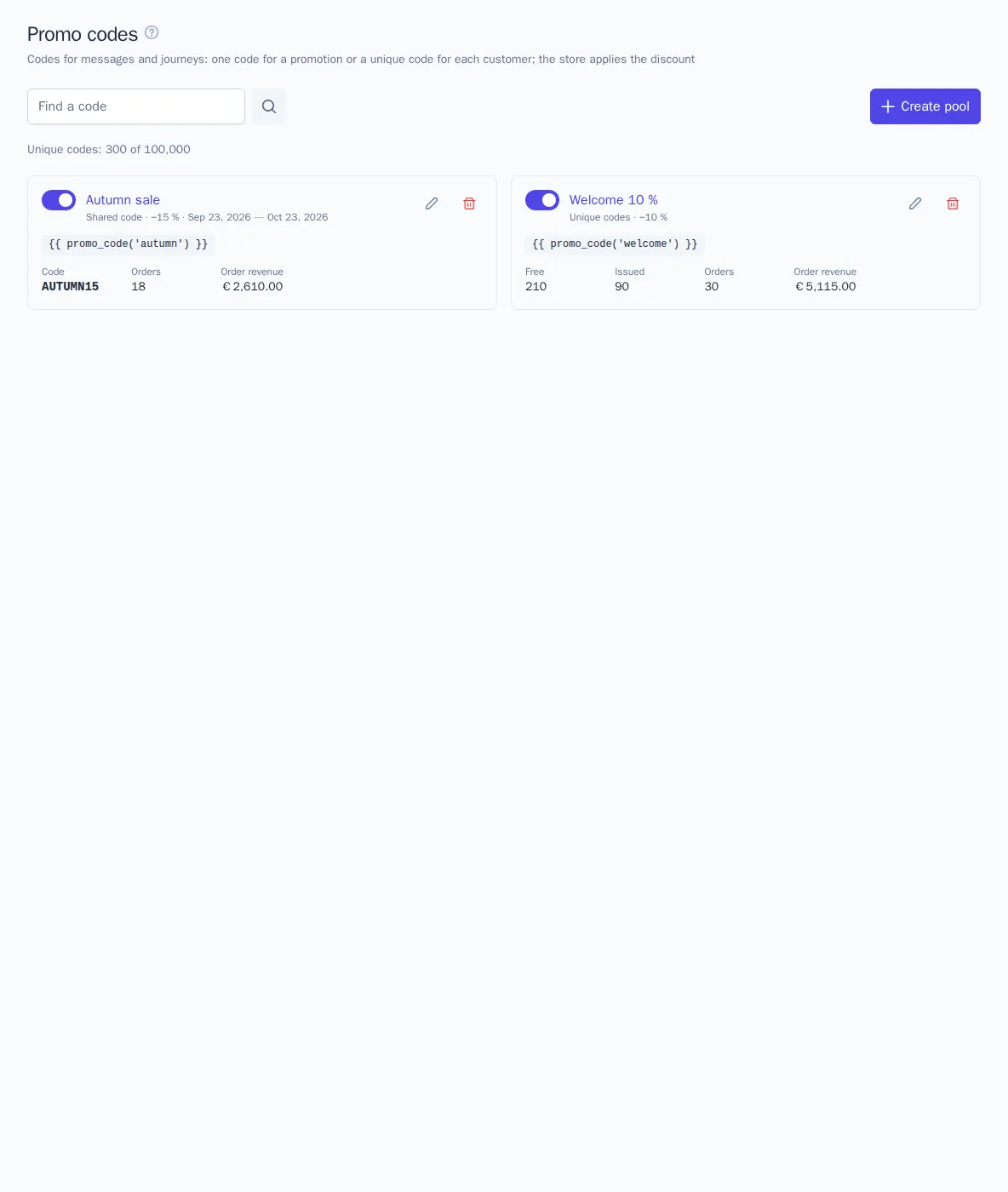
The pool card shows how many codes are free and issued, and how many orders were placed with the codes and for what amount. The switch pauses the pool. The search box at the top finds a code across all pools and shows who it was issued to and which orders used it.
Codes
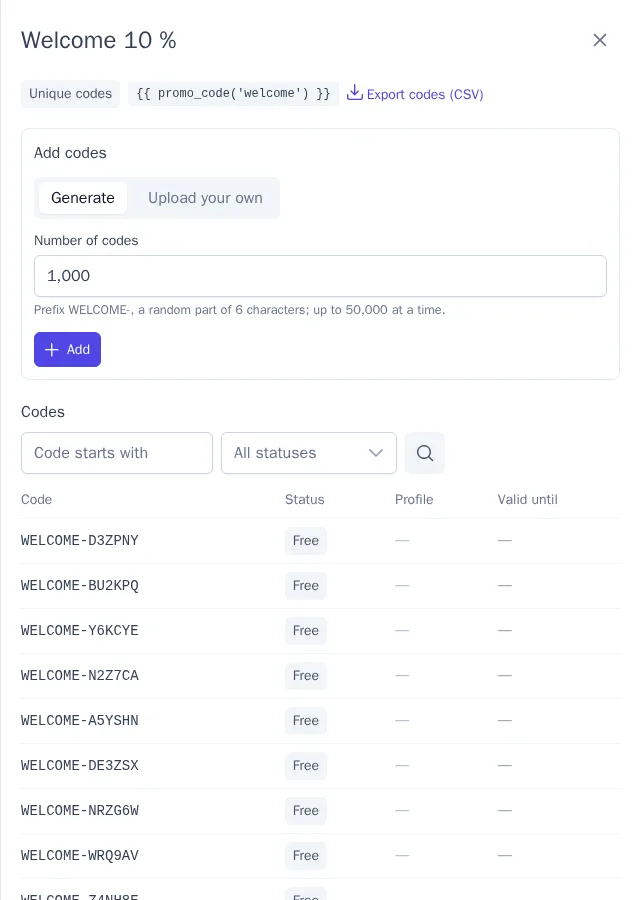
Click a pool's name to open its codes. For a pool with unique codes:
- Generate: codes with the pool's prefix, up to 50,000 at a time. The codes contain no look-alike characters such as 0 and O;
- Upload your own: codes one per line or a CSV or TXT file, up to 100,000 at a time. Codes that already exist in the project are skipped;
- Export codes (CSV): a file with codes, statuses, and validity dates, for uploading them to a store without a plugin.
Below are the codes with a status filter (Free, Issued, Used) and the recent orders with the pool's codes.
Issuing in messages and journeys
- In a template, insert
{{ promo_code('welcome') }}, wherewelcomeis the pool key. When the message is sent, the customer gets a free code, or, if they already have a valid code from this pool, the same code. Previews and test messages show a sample, and no code is used up. If a code can't be issued (the pool is paused, the codes have run out, or the customer has already received all their codes), the message isn't sent. - The Issue a promo code journey node issues a code and follows the no code output if a code can't be issued. The journey's next messages get the same code.
- A code for the friend in a referral is set in the Promo code from a pool field of the referral settings.
Coupons in the store
For the store to accept a code, the code must be a coupon with the right discount. The OneTrace.ru plugins create the pool's codes as coupons themselves, every 5 minutes:
- WooCommerce: based on a sample coupon in the store (discount, products, minimum amount); in the plugin's Promo codes setting, add the line
welcome = SAMPLE-CODE; - Magento 2: as coupons of a cart price rule with the "Specific Coupon" type and auto generation; the line is
welcome = rule ID; - 1C-Bitrix: as coupons of a cart rule; the line
welcome = rule IDin the site settings.
Each unique code becomes a single-use coupon with the code's validity date. Create the shared code as a coupon in the store yourself. The plugins send the order coupons, so the code is counted as used, and cancelling the order releases it.
Unique codes are available from the Growth plan within the plan's quota; a pool with a shared code works on any plan (plans).