Revenue, traffic sources, and attribution
Three reports about money. Revenue shows sales and buyer value. Traffic sources shows where website visitors come from and which of them buy. Attribution shows how much revenue campaigns, journeys, recommendations, and catalog search bring in.
The reports are in the Analytics group of the project menu and aren't available on all plans. See Plans. The period, profile filter, report link, saving, and CSV work the same way as in other reports. See Common to all reports.
Purchase event and currency
All three reports count orders by the Purchase event and its Order amount, for example order_completed and amount. If they're already chosen in the prediction settings, the reports take them from there. If not, choose them at the top of the Revenue page.
The project currency is set in Settings → Project settings, in the Currency field. Revenue and average order value are shown in this currency. An order with a different currency in the currency property isn't included in the report, and the report header shows how many such orders there were in the period. Exchange rates aren't applied. An order without a currency property is counted in the project currency. If the project currency isn't set, all orders are counted, and amounts are shown without a currency sign.
Revenue
Open Analytics → Revenue.
| Metric | What it counts |
|---|---|
| Revenue, Orders, Average order value | The total of orders in the period, their number, and the average amount |
| Buyers, Revenue per buyer | Customers with at least one order, and revenue per buyer |
| New buyers | Customers who made their first purchase ever during the period |
| Returning buyers | Buyers in the period who had also bought before |
| Repeat purchases | The share of buyers with two or more orders in the period |
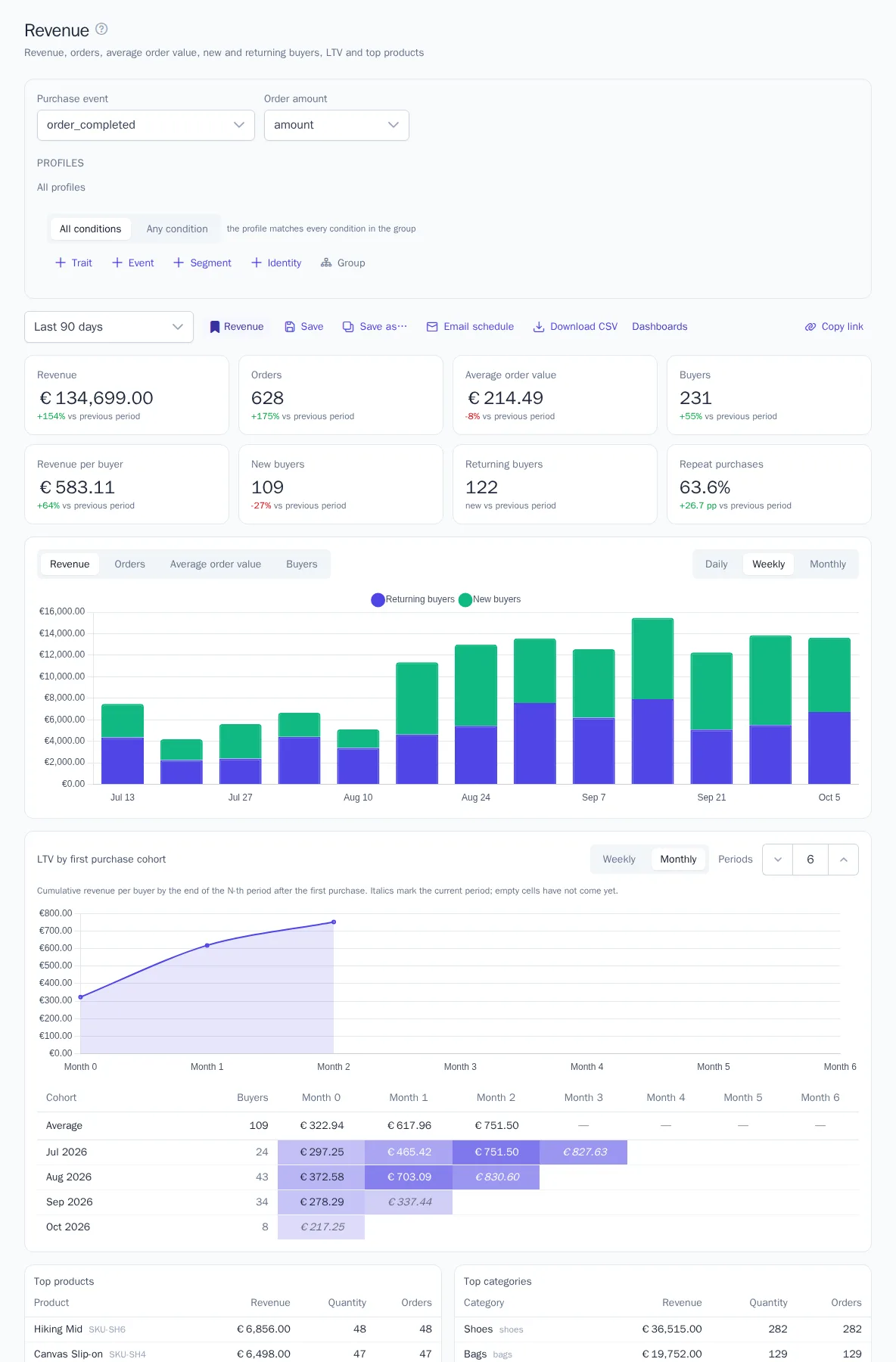
Under each metric, you can see the change compared with the previous period of the same length. The daily, weekly, or monthly chart shows revenue from new and returning buyers, the number of orders, average order value, or the number of buyers.
LTV by first purchase cohort shows how much a buyer brought in on average by the end of the N-th week or month after their first purchase. Each cohort is the buyers who first bought in the same week or month. Empty cells and italics mean the same as in the Retention report.
Top products and Top categories list the 20 products and 20 categories with the highest revenue. Products come from the order lines in products[] (product ID, price, quantity), and categories come from the catalog.
Traffic sources
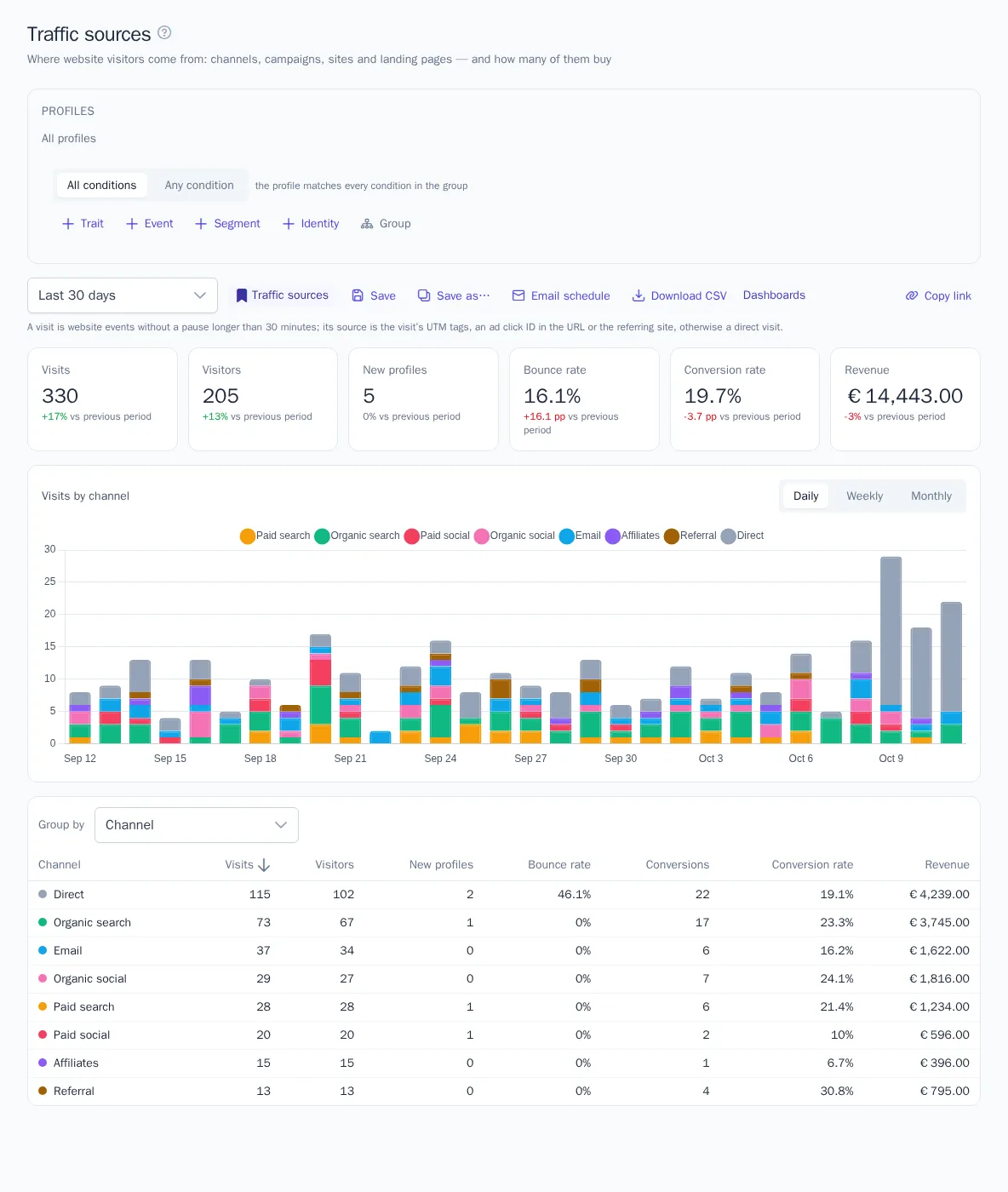
Open Analytics → Traffic sources. The report is based on website tracker events.
- Visit: a customer's events on the website without a pause longer than 30 minutes.
- Visit source is determined by the first event: UTM tags; otherwise an ad click ID in the URL (such as
gclidoryclid); otherwise the website the visitor came from. If there's none of these, the visit counts as direct. - Channel is determined by the source: Paid search, Organic search, Paid social, Organic social, Email, Affiliates, Display, Referral, Other campaigns, Direct. For example,
utm_medium=cpcis paid search, a visit from Google without tags is organic search, andutm_medium=emailis email.
| Metric | What it counts |
|---|---|
| Visits, Visitors | The number of visits and of distinct customers |
| New profiles | Customers who first appeared during the period. They're credited to their first visit |
| Bounce rate | The share of visits with a single event |
| Conversions, Conversion rate | Visits with an order, and their share |
| Revenue | The total of orders placed during visits |
Conversions and revenue appear once a purchase event is chosen. You can group the table by channel, source, source / medium pair, campaign, referring site, or landing page, and sort it by any column.
For more accurate sources, add UTM tags to the links in your ads and campaigns. The tracker remembers the visit's tags and sends them with all events of the visit.
Attribution
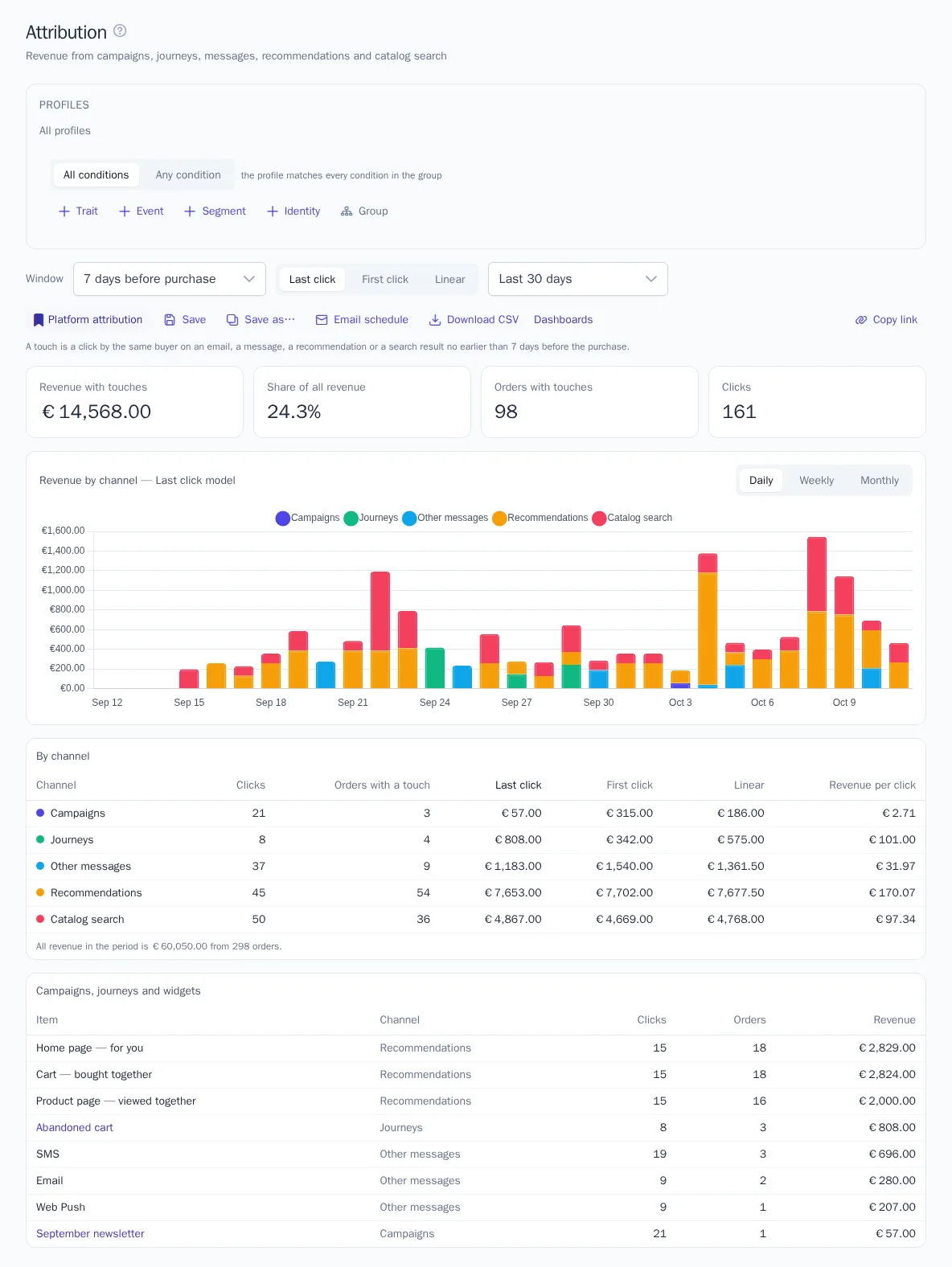
Open Analytics → Attribution. The report links orders to clicks by the same buyer shortly before the purchase:
| Channel | Which clicks count |
|---|---|
| Campaigns | Clicks on links in campaign messages |
| Journeys | Clicks in journey messages |
| Other messages | Clicks in all other messages: manual, transactional, and sent through the API |
| Recommendations | Clicks on products in recommendation widgets |
| Catalog search | Clicks on product search results |
Clicks on links in messages are counted when OneTrace.ru replaces links with its own to track clicks. The tracker sends clicks on widgets and search results by itself.
- Choose the Window: how many days before a purchase a click counts: 1, 3, 7, 14, or 30 days.
- Choose the model. Last click: all of the order's revenue goes to the last click before the purchase. First click: to the first click in the window. Linear: revenue is split equally among all clicks in the window.
The cards show revenue and orders with touches, their share of all revenue, and the number of clicks. The chart shows revenue by channel for the chosen model. The channel table shows the results of all three models side by side, along with revenue per click. Below is a breakdown by specific campaigns, journeys, message channels, and widgets. Click a campaign or journey name to open its page.
An order without clicks in the window has no touches. So the share of all revenue shows how many sales went through OneTrace.ru channels, not how much they brought in on top of regular sales.