Store emails
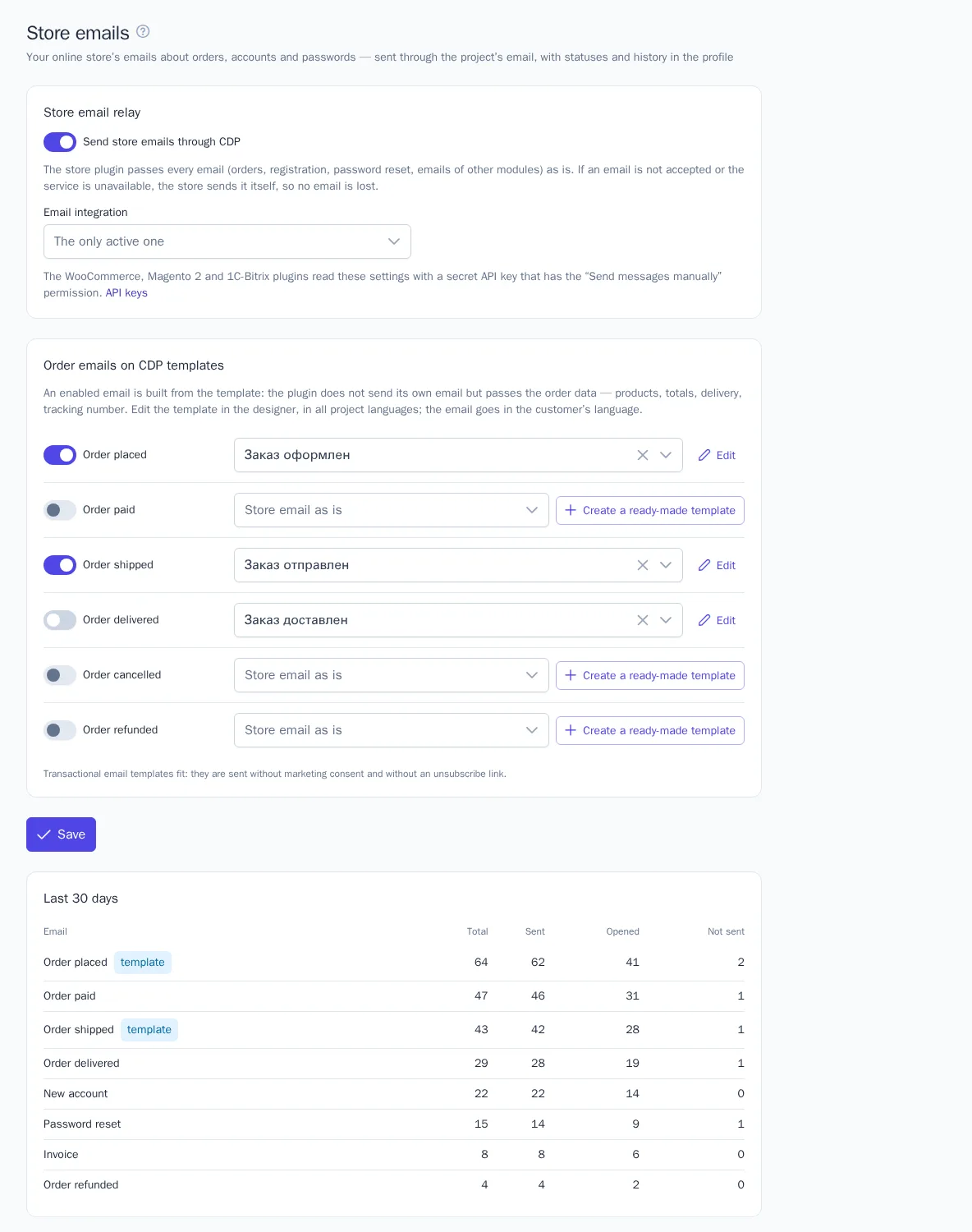
An online store's emails (order, registration, password reset, invoice attached) can go out through the project's email in OneTrace.ru. They get good deliverability, and their statuses (sent, delivered, opened) and history appear in the customer's profile. Order emails can be not only relayed but also built from OneTrace.ru templates: one consistent look, your customers' languages, the parcel tracking number.
This works with the WooCommerce, Magento 2, and 1C-Bitrix plugins, and your own store can send emails through the API. Store emails are available on all plans and count toward the monthly message limit.
The section is in the menu under Engagement → Store emails. All roles with access to templates can view it; Manager and above can change it.
Setup
- Connect email in Integrations: the OneTrace.ru mail service or your own SMTP.
- Install the store plugin and enter a secret key with the Send messages manually permission, see API keys.
- In the Store emails section, turn on Send store emails through OneTrace.ru and click Save.
The plugin reads the section's settings every few minutes, so changes don't reach the store right away. If you have several email integrations, choose the one you need in the Email integration field.
How emails are sent
The plugin passes each store email as is: the subject, body, reply-to address, sender name, and attachments. The email goes to each customer separately and lands in their profile history marked "store email".
- If OneTrace.ru doesn't accept the email (email isn't connected, the message limit is used up, the service is unavailable), the store sends it itself, as before. Emails aren't lost and aren't sent twice.
- Copies to the store and staff (new order, contact form, blind copies) are always sent by the store itself, otherwise staff addresses would get customer profiles.
- Emails with an access link (password reset, new account, address confirmation, sign-in by link or code) go out without click tracking, and after sending only the subject is stored: the link from the email isn't saved.
- Attachments: up to 5 files and 5 MB in total: PDF, images, text, CSV, calendar. If an email has other files, the store sends it itself.
The Last 30 days table shows store emails by kind: total, sent, opened, and not sent. The "template" mark shows emails built from a OneTrace.ru template.
Order emails on templates
For the emails "Order placed", "Order paid", "Order shipped", "Order delivered", "Order cancelled", and "Order refunded", you can turn on a OneTrace.ru template. Then the plugin doesn't send its own email but passes the order data: products with images and options, totals, discount, shipping and payment, addresses, tracking number. The email is built in the customer's language.
- Next to the email, click Create a ready-made template. A transactional template appears with versions in all of the project's languages, and it's selected right away.
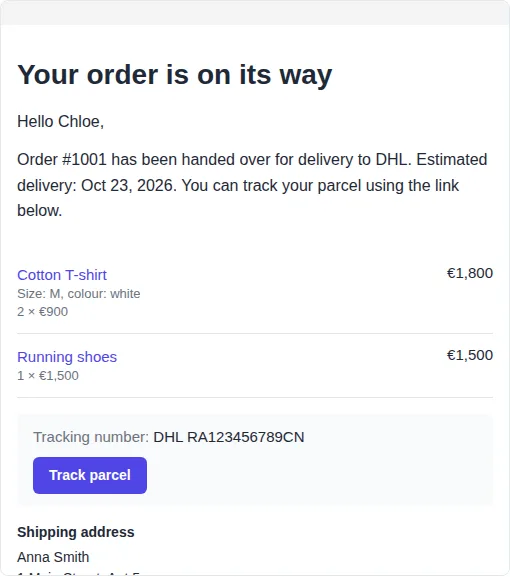
- Click Edit and check the template: text, colors, logo. The preview uses a sample order.
- Turn on the switch next to the email and click Save.
Instead of the ready-made template you can pick any of your own: transactional email templates fit. If you turn the template off, the email goes out as a store email again.
Platforms usually don't have "Order shipped" and "Order delivered" emails. When their templates are on, the plugin sends them itself: "Order shipped" for each parcel once it gets a tracking number, "Order delivered" when the order moves to a delivered status. If the template is off, these emails aren't sent.
The Order block
In the email builder, the Order block shows the order from the store email: products, totals and payment, parcel tracking with a button, and addresses. You can turn off each part, and change and translate the labels. In emails without an order, the block isn't shown.
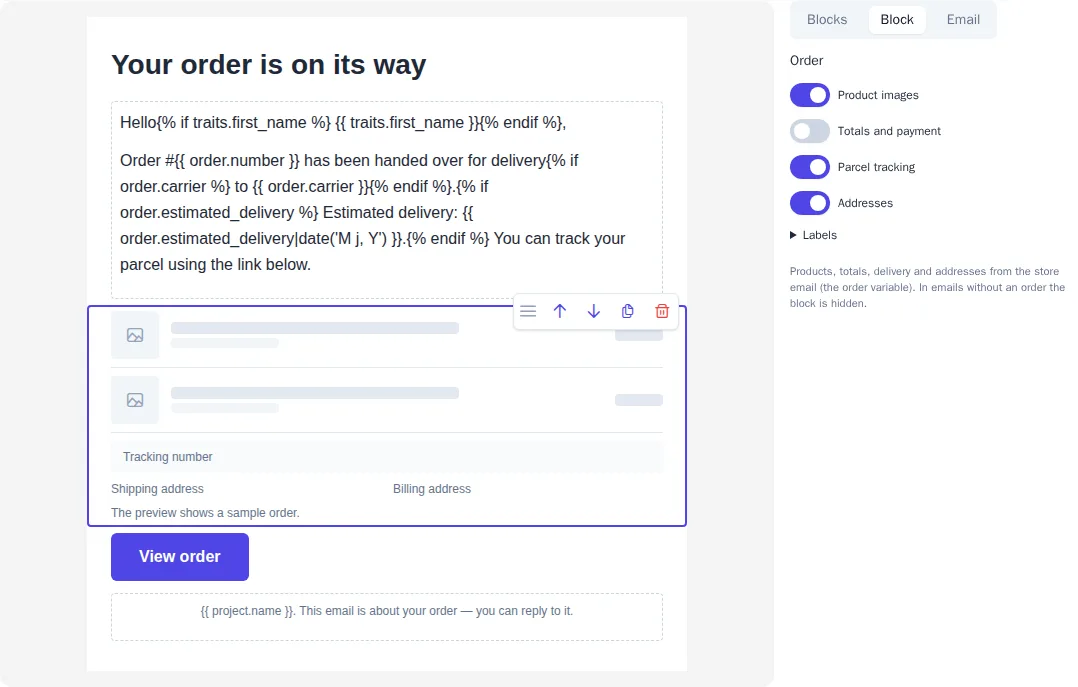
In the template text, the order is available as the order variable:
| Variable | What it inserts |
|---|---|
order.number, order.url |
The order number and a link to it in the customer's account |
order.amount, order.subtotal, order.discount, order.shipping, order.tax, order.refund_amount |
Order and refund amounts |
order.carrier, order.tracking_number, order.tracking_url, order.estimated_delivery |
Carrier, tracking number, tracking link, expected date |
order.payment_method, order.shipping_method, order.reason |
Payment and shipping methods, the reason for cancellation or refund |
order.products |
Products: product_name, quantity, price, total, image_url, url, options |
Output amounts with the money filter: {{ order.amount|money(order.currency) }} shows "€12.50" or "1,250 ₽" following the email language's rules.
Your own store
A store on its own platform sends emails with a POST /api/v1/emails request and a secret key, and reads the section's settings with GET /api/v1/emails/settings. If a template is turned on for an email kind, pass the order data in the order field instead of the subject and HTML. The full list of fields is in the API reference: https://cdp.onetrace.ru/api/v1/openapi.json. Ready-made methods are in the PHP library and the Laravel package, see Server integration. The Laravel package can send all of an app's emails through OneTrace.ru and fall back to regular mail if it's refused.