Store data for the bot
The AI in chat bot can answer not only from the knowledge base but also with live store data: where an order is, its tracking number, whether a product is in stock, how much delivery costs, and how to return a purchase. If you allow it, the bot can also cancel an unpaid order or pass a return or delivery change request to the store. To do this, the store connects to the bot over MCP (Model Context Protocol): the bot calls the store's tools, and the store answers with data.
You can connect a store on any plan, but the bot, like all AI in chat, works on a paid plan: answers with store data are charged like regular AI answers, from the project balance. See Billing.
Connecting
The easiest way is our store plugin. The plugin runs the server itself and connects it to the project when you save the settings:
| Platform | Where to turn it on |
|---|---|
| WooCommerce | WooCommerce → Settings → OneTrace.ru → AI chat bot: store MCP |
| Magento 2 | Stores → Configuration → OneTrace.ru → AI chat bot: store MCP → Connect to the chat bot |
| 1C-Bitrix | Module settings → site tab → AI chat bot: store MCP block → Connect to the chat bot |
The plugin's secret key needs the "Connecting the store MCP server to the AI bot" permission (chats.manage). Key permissions cannot be changed after the key is created: if the plugin's key does not have it, create a new key in API keys with the same permissions plus this one and enter it in the plugin settings. Sites of the same project are connected once.
A custom store on PHP or Laravel connects with the ready-made server from the PHP library and the Laravel package: the developer only writes the tool handlers. Any other server that implements the store MCP contract is connected manually: in Chats → Chat settings → Bot → Store (MCP), enter the https://… address, the access key issued by the store, and a name. The contract, with the tools, errors, and customer confirmation, is described in For developers.
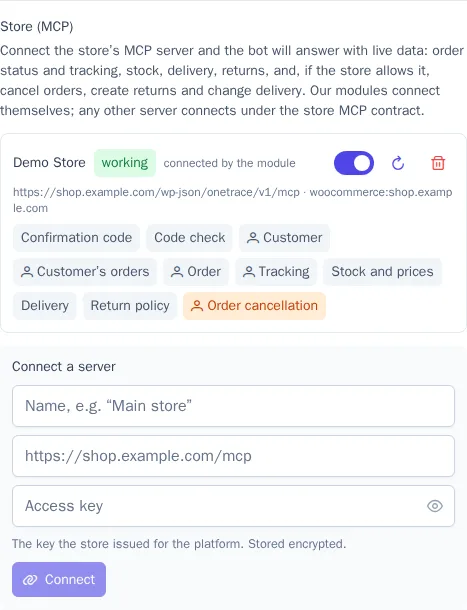
The Store (MCP) section shows whether the server is working and which tools the store has allowed the bot. The switch turns the server off temporarily, and the refresh button checks it again and rereads the tools (the platform also does this once a day).
What the bot can do
The store decides what the bot is allowed to do, in the plugin settings. By default, only reading is on:
| Tool | What the bot does |
|---|---|
| Customer's orders, Order | Finds the customer's orders and tells them about an order: items, total, payment, delivery method, and address |
| Tracking | Names the carrier and tracking number and gives a tracking link |
| Stock and prices | Finds a product by name or SKU and says whether it's in stock and in which variants |
| Delivery | Lists delivery methods with prices and the free delivery threshold |
| Return policy | Summarizes the store's return policy |
Actions stay off until the store allows them:
| Action | What happens |
|---|---|
| Order cancellation | The bot cancels an order that hasn't been paid or shipped |
| Return request | The request goes to the store as an order note and an email to staff |
| Delivery change | A request for a new address, date, or time goes to the store the same way |
Tool descriptions for the model are set by the platform, not by the store, and the bot treats the store's answers as data, not instructions. If a bot reply contains prices, dates, or promises that aren't in the store data, the reply check won't let it through to the customer.
Customer confirmation
Orders and actions on them are available only to a confirmed customer: the bot won't show someone else's order or even confirm that it exists. A customer can be confirmed in two ways:
- Signing in on the website. If the customer is signed in to their store account, the plugin passes a signed token to the chat widget, so the bot knows right away who's writing.
- Code. In messengers and for guests, the bot asks for the email used in the store, the store sends a 6-digit code to it, and the customer types the code in the chat. The code is valid for 10 minutes, with no more than 5 codes per hour for one address.
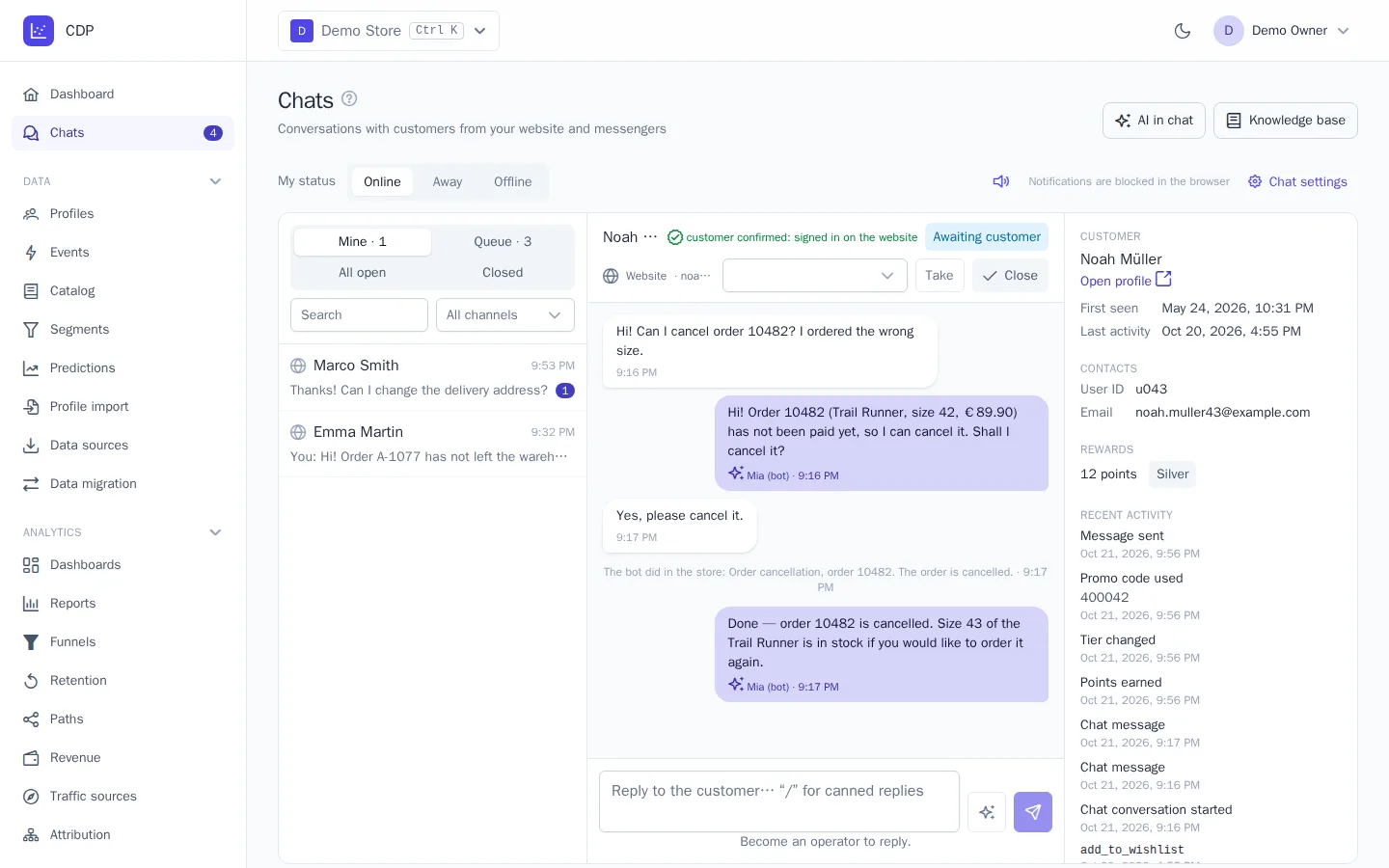
Confirmation is valid for 24 hours. The operator sees it in the conversation window: "customer confirmed: signed in on the website" or "customer confirmed with a code". The customer's token is stored encrypted in the conversation; neither the model nor operators can see it.
Actions in the store
The bot performs an action only after the customer explicitly agrees:
- The bot describes what it will do, with the order number and items, and asks for confirmation.
- The customer agrees in the chat, for example "yes, please cancel it".
- A separate rating model checks that the customer agreed to exactly this action. A question, a doubt, or a different request isn't consent.
- The store performs the action; calling the same action again doesn't repeat it.
A line "The bot did in the store: …" with the result appears in the conversation, and the project's audit log gets a "Bot action in the store" entry. Operator drafts use store data for reading only: operators perform actions themselves, in the store.
For developers
Your own server connects if it implements version 1 of the store MCP contract. For PHP and Laravel, the contract is already implemented: the StoreMcp\Server class in the PHP library and the POST /onetrace/mcp route in the Laravel package. You only need to write the tool handlers.
Transport. MCP Streamable HTTP, protocol version 2025-06-18: a single address, POST requests with JSON-RPC 2.0, and the response is JSON or a text/event-stream stream with a single response. The address must be https:// on a public IP, with no redirects. The response must take no longer than 10 seconds and be no larger than 256 KB. The platform calls initialize, notifications/initialized, tools/list, and tools/call; the Mcp-Session-Id header is supported but not required.
Access. Every request carries Authorization: Bearer <key>; the store creates the key, at least 32 random characters long. A request without a key or with a wrong key gets a 401 response.
Contract marker. In the response to initialize, the server declares capabilities.experimental["onetrace/store"] = { "version": 1 }. Without it, the server isn't connected.
Tools. Names are exactly as in the table, and tools/list returns only the tools the owner has allowed. Each tool has the annotation readOnlyHint: true (reading) or destructiveHint: true (action) and _meta["onetrace/auth"]: customer means a confirmed customer is required, none means it isn't. The result is structuredContent plus the same JSON as text in content[0].text. Amounts are { "amount": 1250.5, "currency": "RUB" }, dates are ISO 8601.
| Tool | Access | Input | Result |
|---|---|---|---|
store_start_verification |
none | contact, order |
sent, channel, destination |
store_verify |
none | contact, code |
customer_token, expires_at |
store_get_customer |
customer | — | id, email, phone, first_name |
store_find_orders |
customer | status, limit (up to 20) |
orders: order, created_at, status, status_label, total, items_count |
store_get_order |
customer | order |
the order with items, total, payment, shipping, can_cancel, can_return |
store_get_tracking |
customer | order |
carrier, tracking_number, tracking_url, status, events |
store_check_availability |
none | query, sku, or product_id |
products (up to 10) with in_stock, quantity, variants |
store_get_delivery_options |
none | country, city, postcode, total |
methods: name, price, free_from, min_days, max_days |
store_get_return_policy |
none | — | days, conditions, text, url |
store_cancel_order |
customer | order, reason |
order, status, message |
store_create_return |
customer | order, items, reason |
return_id, status, instructions |
store_change_delivery |
customer | order, address, date, time_window |
order, message |
The order status is one of pending, processing, on_hold, shipped, delivered, completed, cancelled, refunded, failed. Another customer's order gets a not_found response, as if it didn't exist.
Customer. The store issues and checks the customer_token, valid for no more than 24 hours. The store sends the confirmation code itself and answers the same way whether or not such a customer exists; the code has 6 digits, is valid for 10 minutes, allows up to 5 attempts, with up to 5 codes per hour per address. For a signed-in customer, the page passes the token to the tracker: cdp.chatCustomer('…').
Call context is in params._meta: onetrace/customer_token, onetrace/language (the conversation language), onetrace/conversation, and for actions also onetrace/confirmed: true and onetrace/idempotency_key. The server rejects an action without onetrace/confirmed; a repeat with the same idempotency key returns the same result without performing the action again.
Errors are isError: true and structuredContent: { "error": "<code>", "message": "<text for the customer>" }:
| Code | When |
|---|---|
auth_required |
a confirmed customer is required |
invalid_code |
the code is wrong or expired |
not_found |
no such order or product |
not_allowed |
the action isn't available in this state or is turned off by the owner |
invalid_input |
invalid arguments |
rate_limited |
too many requests or codes |
unavailable |
a temporary store failure |
Connecting from a plugin. The plugin registers its server with a secret key that has the chats.manage permission: PUT /api/v1/chat/store-mcp with url, key, name, platform connects or updates the server, and DELETE /api/v1/chat/store-mcp with url disconnects it.